
PLC & Automation Systems
Obsolete PLC: One Dead Module vs Full Upgrade
When one discontinued module forces a full upgrade — and when it doesn't. Scoping a partial retrofit: I/O mapping, footprint, drawings, re-FAT.
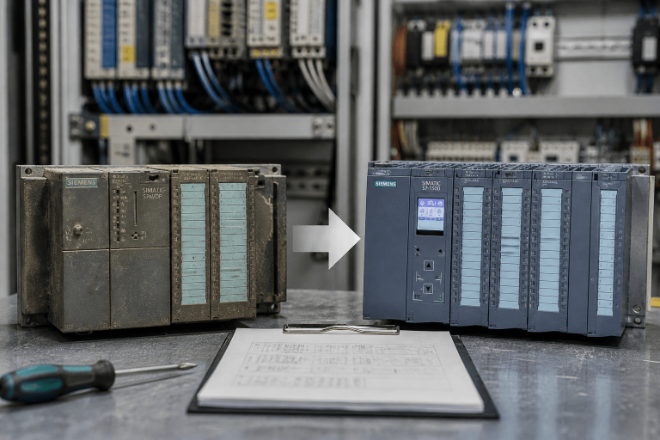
Obsolete PLC Replacement: When a Single Module Forces a Full System Upgrade (And When It Shouldn’t)
A common situation in industrial plants:
- A PLC module fails
- The model is discontinued
- A replacement is sourced
Everything seems straightforward.
Until installation starts.
Case: Same Model, System Does Not Start
A client replaced a Siemens S7-300 module with the same model from a different batch.
After installation:
- PLC powered on normally
- HMI could not read data
- Communication fault remained active
Root cause:
- Firmware version mismatch
- Existing program required older communication behavior
The module was correct.
The system was not compatible.
Why Obsolete Parts Often Lead to Upgrades
When replacement fails, engineers often recommend a full upgrade.
Not because it is the only solution, but because
- Debugging takes too long
- System documentation is incomplete
- Project timelines are already tight
At that point, upgrading becomes the lowest-risk option.
Where Replacement Actually Breaks
In most cases, failure does not come from the part itself.
It comes from system-level constraints.
1. Firmware and Version Dependency
Older systems rely on specific firmware behavior.
Newer replacements may
- Change communication timing
- Modify protocol handling
- Require different configuration
This breaks existing logic.
2. Program Compatibility
Even if hardware fits:
- PLC program may not compile
- Memory structure may differ
- I/O mapping may shift
Result: The system cannot run without reprogramming.
3. Communication Layer Issues
Mixed systems often include the following:
- Profibus
- Modbus
- Ethernet/IP
Replacing one component can break the entire network.
4. Missing System Knowledge
In many older plants:
- No updated drawings
- No full BOM
- No version records
This makes accurate replacement difficult.
Replace or Upgrade: A Quick Decision Table
Use this table to frame the decision before anyone quotes you a full retrofit:
Situation | Check first | Replacement viable? | Main risk |
|---|---|---|---|
Module discontinued, same firmware family still available | Firmware revision against program requirements | Often yes | Wrong revision breaks communication |
Module discontinued, no firmware match | Program migration effort and source code availability | Rarely | Extended commissioning |
Several modules failing in the same rack | Rack and backplane condition | Doubtful | Cascading failures after swap |
Program source code lost | Recovery options before touching hardware | No | Full re-engineering |
Safety or compliance rules changed | Applicable standards at destination market | No | Approval rejection |
The table will not answer the question by itself, but it forces the right checks in the right order — before money is spent on either path.
When Upgrade Is Actually Necessary
Not all cases can be solved by replacement.
An upgrade is justified when:
- Core PLC series is fully discontinued
- Program cannot be migrated
- Communication architecture must change
- Safety or compliance requirements have changed
In these cases, an upgrade is a technical requirement.
When Replacement Is Still Possible
Replacement is often feasible if:
- Firmware compatibility can be matched
- Program can run with minor adjustments
- Communication protocols remain unchanged
- System architecture is stable
The key is not the part.
It is whether the system constraints are understood before installation.
What Should Be Verified Before Replacement
Before deciding between replacement and upgrade, several checks are required:
- PLC firmware and hardware revision
- HMI and communication protocol compatibility
- Program structure and dependencies
- I/O configuration and addressing
- Availability of supporting components
Skipping these checks is the main reason replacements fail.
How This Connects to Control Panel Integration
Obsolete replacement is not just a sourcing issue.
It is a system integration problem.
If components are selected without system validation, the panel may be assembled correctly but still fail during commissioning.
Where Obsolete Parts Actually Come From
When a module is no longer on the manufacturer's price list, it does not disappear from the market. It moves into four channels:
- Plants running the same system - decommissioned lines often release tested spare modules
- Stocking distributors and brokers holding new-old-stock inventory
- Refurbished units, typically pulled from scrapped systems and retested
- Surplus lots sold as-is, usually the cheapest and the riskiest
Lead time depends on which channel the part comes from. In-stock modules can ship in 3 to 5 days. Scarce revisions can take several weeks, especially if testing is required before dispatch.
The channel matters more than the price. An as-is module that fails at commissioning costs more than a tested unit at twice the price, because the project timeline is what the plant actually pays for.
How UniRegal Handles Obsolete Replacement
In projects involving discontinued automation parts, the focus is placed on system compatibility before shipment.
Typical checks include the following:
- Version and firmware alignment
- Cross-brand compatibility validation
- PLC / HMI / drive system matching
- BOM completeness verification
- Pre-delivery inspection
This reduces the risk of replacement failure and avoids unnecessary upgrades.
Frequently Asked Questions
Can you still buy Siemens S7-300 modules?
Yes. Although the S7-300 series is discontinued, modules circulate through stocking distributors, brokers and refurbished channels. New-old-stock and refurbished units are both available - but check the firmware revision against your program before ordering, not after.
How do I verify a replacement module will work?
Three checks before shipping: CPU firmware revision matches what the program expects, memory configuration covers the existing program, and communication settings (Profibus, Modbus, Ethernet/IP) are compatible. A supplier who cannot provide version photos or test results is selling you a gamble.
Is refurbished PLC hardware worth buying?
It is worth it when the unit has been tested with a warranty behind it. It is a risk when sold as-is. For a production line that runs continuously, tested-with-warranty should be the baseline, not a premium option.
How long does obsolete PLC sourcing take?
In-stock modules typically ship within 3 to 5 days. Scarce revisions can take 2 to 6 weeks including functional testing. Plan the production window around the check-and-test time, not just the shipping time.
Conclusion
Obsolete parts do not automatically require system upgrades.
Most upgrade decisions happen because replacement risks are not evaluated early enough.
Understanding firmware, program compatibility, and system constraints is critical to making the right decision.
If you are dealing with discontinued parts right now, these guides cover the next step:
Stuck with obsolete PLC parts? We source discontinued modules and scope partial retrofits so you avoid a full rip-and-replace. Talk to our team about your project.ntinued PLC systems or uncertain replacement options, provide the following:
- PLC brand and model
- Current issue (failure / obsolete)
- System type and application
- Required timeline
We can help evaluate whether replacement is feasible before committing to a full upgrade.
Where to go next: sourcing the replacement
Once you know whether you are replacing one module or the whole rack, the next question is availability — lead time, condition, and what the replacement does to the rest of the panel. Our obsolete PLC replacement sourcing guide lists exactly what to send us so a quote comes back in one round: photos of the module label, the rack configuration, the firmware or hardware revision, and what the machine has to keep doing while you wait.